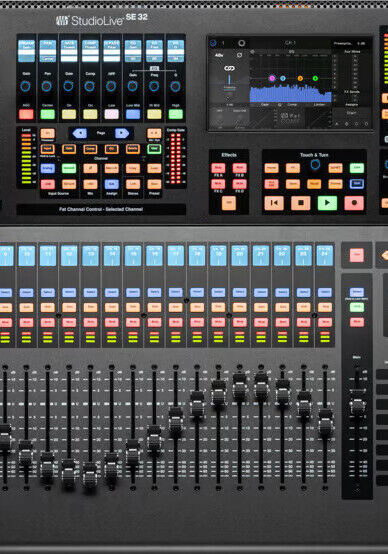


Headliner takes a look at the Presonus Studiolive Series III SE 32, the NSB3216 AVB stage box and its integration with the Studio One DAW software suite. Is this finally a serious all-rounder that doesn’t break the bank? We find out!
In the Hybrid world of consoles that are designed for both live and studio work, the genuine articles seem few and far between. While nearly all live desks offer USB multitrack interfaces to connect to a DAW — as far as I'm aware – at the professional end of the spectrum, only the Avid S6L offers full ProTools integration between surface and DAW. However, as with all things Avid, although the sound quality is unquestionable, the price tag is well beyond the means of smaller home studio setups or a complementary live mixing and recording option for PA companies.
Entering our radar is the PreSonus Studiolive range of products. These have been around since 2009 in various guises and have seen a number of improvements and new models introduced since. As far as I’m aware, the Studio Live range was launched initially as a cost-effective live console that could both mix and record via a USB interface using PreSonus’s Capture software on a laptop. This also provided close integration with PreSonus’s Studio One DAW. I also understand from Presonus’s UK distributor, Fender, that their own DAW, Fender Studio Pro, is also fully integrated with the Presonus StudioLive SE 32.
PreSonus have characterised the StudioLive as a desk sporting an analogue-style workflow, with a view to keeping it as logical and easy to use as possible. When getting to grips with a new ecosystem, simplicity is music to my ears.
What’s New
The latest model introduced in July 2025 is the Special Edition (SE) range and is available in either a 16, 24 or 32 channel format. Essentially, it’s the same mixer engine under the hood in all three. The only difference is the number of faders available on each layer and the physical inputs and outputs available on the rear panel. Regardless of fader count, the StudioLive is a 40-channel, 26-bus mixer with a myriad of I/O options. Firstly, MiLan certified AVB networking to allow connection of remote stage boxes. 64 x 64 USB interface which integrates channels for recording, playback, Virtual sound check and I/O for external plugins, etc.
I’m reliably informed it’s also possible to use two StudioLive consoles within the same setup, one at front of house, and one for monitors, linked via the PreSonus AVB Hub. Gain compensation is available to make sure that one engineer's adjustment doesn’t impact another’s when using a network stage box or sharing local inputs on, say, the monitor board. Without a second desk, I wasn’t able to see this in action, but this aside, with a price tag for the SE 32 of under £3,000 or $3,500 including Capture, Universal Control, Studio One 7 perpetual licence and the Fat Channel Plug-In Suite, represents real value for money!
The whole visual appearance of the desk misleads you into thinking it could be pricier than it actually is. Its sleek, dark appearance and colour-coded buttons help assist workflow in a positive way and are an improvement on the SE’s predecessors, even though the layout of the controls looks largely familiar.